Reuse a temp mail address
Paste a saved Mailxus access token below to reopen the same temp mail inbox on any device or browser. The address never expires, but messages are kept for 24 hours. The token is the only credential, and there is no account-based recovery if you lose it.
Last updated July 2026
Mailxus lists every address you create in this browser, so you can go back to an old one without pasting a token. That list belongs to this browser alone, and clearing browser data removes it. Download a backup file first, and the tokens inside it will reopen those addresses anywhere.
Reopen an inbox
Copy the token from "View access token" on the address you want to keep.
The short version
- The access token is the only key to a Mailxus inbox. Save it and you can reopen the address anywhere.
- The address never expires, so a token from last week still opens the same inbox.
- Messages themselves are kept for 24 hours, then removed. The address stays.
- Anyone who has the token can read that inbox, so keep it private like a password.
- One click downloads every address in this browser, with its access token, as a single backup file.
What does reusing an address mean?
Reusing means reopening an address you already created instead of generating a new one. Paste its access token to load the same inbox with messages still within the 24-hour window. Reopening does not resend mail or change the address saved by other sites.
Why reuse an address instead of making a new one?
A new address works for a one-time signup you will not revisit. If a service may email you later with a sign-in code, password-reset link, receipt, or shipping update, save the token and reuse the same address instead of starting over.
Reuse vs a new address each time
| What matters | Reuse (saved token) | New each time |
|---|---|---|
| Message history | The same inbox with messages less than 24 hours old | A separate empty inbox with no earlier messages |
| Signing back in | The same email address for sign-in links or codes | A different email address from the one on the account |
| Setup | Paste one token | Nothing to paste, but you start over |
| Best for | A service that may email the address again | A single throwaway signup |
For a one-time code you will never need again, a short-lived throwaway address is enough.
How to reopen your inbox
If you saved the access token, you can reopen the inbox on any device or browser.
Find your access token
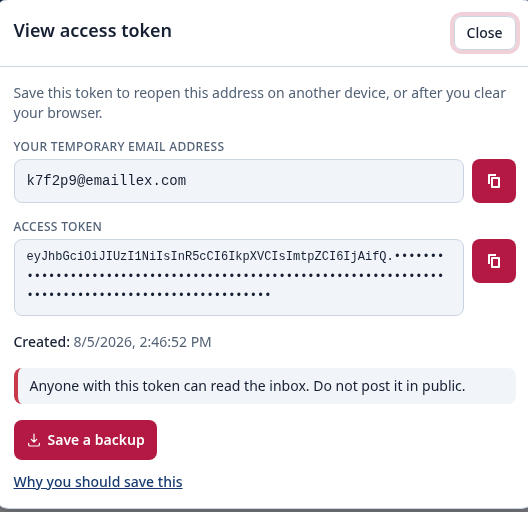
While the inbox is open, select "View access token" and copy the token. Store it somewhere private.
Open this page
Come back to Reuse Address on any device or browser where you want that inbox.
Paste the token and reopen
Paste the token into the box above and select Reopen inbox.
Inbox reopened
The same address reopens with any messages still within their 24-hour window. Keep the token private so you can return later.
When reusing an address helps
Signing back into a service
A site emails a login link or code weeks later. Reopen the address that received the first one and the code lands in the same inbox.
Catching a delayed email
Some confirmations and receipts arrive after signup. Save the token so you can reopen the address and check for them. After a message arrives, it remains for 24 hours.
Moving between devices
Create the address on your laptop, paste the token on your phone, and read the same inbox on both. No account needed.
Keeping one address per service
Use a separate saved address for each site. If one token is exposed, it does not open your other Mailxus inboxes.
Where your addresses are stored
Mailxus keeps two things about your addresses in this browser: the address you are using right now, and the list of every address you created here. The two are kept apart, so you can lose one and keep the other.
Two storage areas, both inside this browser
The address you are on is held on its own, so the page can reopen it the next time you visit. The full list is held separately, and that is what Saved addresses reads. Clearing browser data removes both, because that one action empties every storage area this site uses.
When this browser does not save the address
A private window keeps the address while you stay in it, so reloading is safe. Close every private window and the address is gone. A browser that blocks storage, or is low on it, keeps nothing, so your next visit starts with a new address. The list holds 200 entries at most. Once it is full, the address you opened least recently drops off, and that is not always the one you created first.
There is no account here, so nothing on our side proves an address is yours. A saved token, or a backup file, is the only way back.
Where to see every address you created
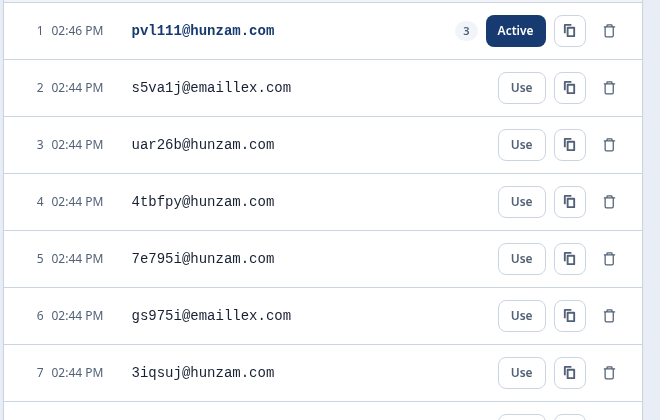
Saved addresses sorts your addresses newest first and groups them by day. Search for one, then select "Use" to switch your inbox to it.
Each row shows how many messages the inbox held the last time you opened it. That number updates only when you open the inbox again, and it can come back lower, because messages are removed after 24 hours.
The arrow in the address box on the home page shows the 10 addresses you used most recently, including the one you are on. This page shows all of them.
Download a backup of your addresses
A backup is a JSON file holding your addresses and their access tokens. It is the only copy that lives outside this browser.
Select "Save a backup" inside "View access token" to store the address you are on. Select "Export" on Saved addresses to store all of them at once, whatever the search box is showing.
Both files use the same JSON format. You can open either one in a text editor to read the tokens.
If no file downloads, your browser is blocking the download. Private windows and managed work computers often block it, and Mailxus gets no error to show you. Copy the access token from "View access token" instead.
The file stores your access tokens as plain text, with no password on it. Keep it off shared computers, and do not send it through chat.

What deleting an address does
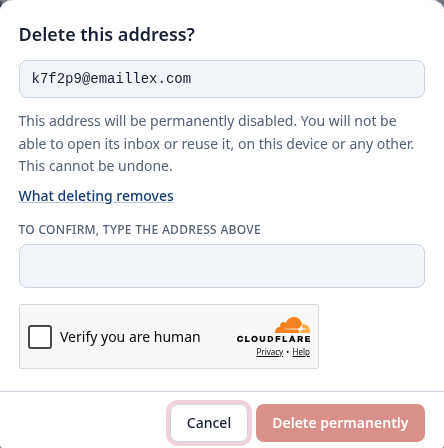
Every delete button removes the address itself. Mailxus has no button that hides a row and keeps the address. If you only want a shorter list, use the search box.
Deleting is not the same as tidying your list. Every button that deletes an address does the same thing: it disables the address on our servers.
A deleted address stops accepting mail on our servers, so it is gone on every device. An access token you saved earlier will no longer open it.
What happens next depends on where you delete from. On the home page, a new address takes the place of the old one. On Saved addresses, nothing takes its place, so select "Use" on another row, or open the home page to get a new address.
Deleting a single message removes only that message. The address itself continues to receive mail.
If something does not work
"Access token is not valid"
The token may have been cut off or include extra spaces. Copy the entire token with no spaces before or after, then paste it again.
The inbox looks empty
The address is back, but messages older than 24 hours are already removed. Only recent messages remain.
A token from another site fails
Only a valid Mailxus access token can open a Mailxus inbox. Tokens from other services will not work.
You lost the token
Mailxus has no account or recovery process, so it cannot recover an inbox without its token. Generate a new address and save its token.
Your addresses are missing on a new device
Saved addresses does not move between devices. Open your backup file, copy the access token for the address you want, and paste it into the box above.
Keep your access token safe
The token is the only thing that opens your inbox, so it works like a password.
Treat it like a password
Anyone who has the token can read that inbox. Do not post it publicly or share it with anyone you do not trust.
Store it deliberately
Save it in a password manager or a private note, labeled with the site where you used the address.
Use one address per service
Separate addresses keep a leaked token from exposing your other inboxes.
Frequently asked questions about reusing temp mail
What is a Mailxus access token?
It is the only credential Mailxus creates for an address. There is no account or login. Anyone with the token can reopen and read the inbox.
How do I reuse a temporary email address?
To reuse a temp mail address, paste its saved access token on this page and select Reopen inbox.
Where do I find my access token?
Open "View access token" for the address and copy the token shown there. Store it privately because there is no account-based recovery if you lose it.
Does a Mailxus address expire?
No. The address stays yours for as long as you keep its token. Individual messages are removed after 24 hours, but the address itself has no time limit.
Can I open the same inbox on another device?
Yes. Paste the same access token on any device or browser to reopen the same inbox.
Can I recover a temp mail inbox without its access token?
No. There is no email or password to reset, so a lost token cannot be recovered. Create a new address and save its token.
Is my token safe to share?
No. Anyone with the token can read the inbox, so treat it like a password and keep it private.
Will old messages still be there when I reopen?
Messages within the last 24 hours are still there. Older ones are already removed, but the address and any recent mail remain.
Do I need an account to reuse an address?
No. Mailxus has no accounts. The access token replaces a username and password.
Why does my token say it is invalid?
The token may be incomplete or contain extra spaces. Paste the complete token with no spaces before or after it. If it still fails, it is not a valid Mailxus token.
Can I reuse more than one address?
Yes. Save a separate token for each address, then paste the token for the inbox you want to reopen.
Is reusing an address free?
Yes. Mailxus is free, and reopening an address with its token costs nothing and needs no signup.
Can I reopen a disposable email address after its messages expire?
Yes. The address never expires, so its token can reopen it after older messages are removed. Removed messages cannot be recovered, but the address can continue receiving new mail.
Does a Mailxus access token expire?
No. A saved token continues to reopen the same address. Individual messages are kept for 24 hours, then removed.
What is the difference between Saved addresses and an access token?
Saved addresses remembers addresses in the browser where you created them. An access token lets you reopen an address in any browser or on any device.
Can I get an address back after I clear my browser data?
Clearing your browser does not delete the address. It stays on our servers and keeps receiving mail. You lost only this browser's copy of the access token, so a token or a backup you saved elsewhere opens the address again.
Does deleting an address delete its messages?
Yes. Deleting an address removes its messages with it, and neither can be recovered.
Need a fresh inbox instead?
Reuse works only when you saved the token. If you do not have it, generate a new temporary email address and save its token.